![rpic-yoga_flexible_software-logo-color (1).png]](https://hubsupport.rpic.com/hs-fs/hubfs/rpic-yoga_flexible_software-logo-color%20(1).png?height=40&name=rpic-yoga_flexible_software-logo-color%20(1).png)
Table of Contents
Navigation & Shared Concepts
AP Leadership
Subscription Report
STP & Touches
Open AP Accrual Report
Invoice & Processor Lifecycle
Purchase Invoice Resolution
Duplicate Vendor
Vendor Maintenance
EDI
Packing Slip Management
Receipt Management
Permissions
FAQ
Navigation
From Yoga, open V2 Reports experience. A left-hand navigation groups reports into three sections:
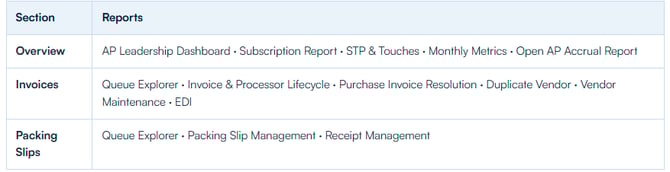
Note: Some reports (for example, Packing Slips, EDI or Receipt Management) appear only when enabled for your tenant. Monthly Metrics opens Yoga’s existing monthly metrics experience.
Both versions of reports will remain active in production through Q3 2026. We will deprecate Legacy Reports in Q4 2026.
Shared concepts (all reports)
Date range picker
Many reports have a blue date-range control to the right of the title(presets such as Last 7 / 30 / 90 Days, This Month, Last Month, or a custom range). Changing the range refreshes date-sensitive widgets without leaving the page.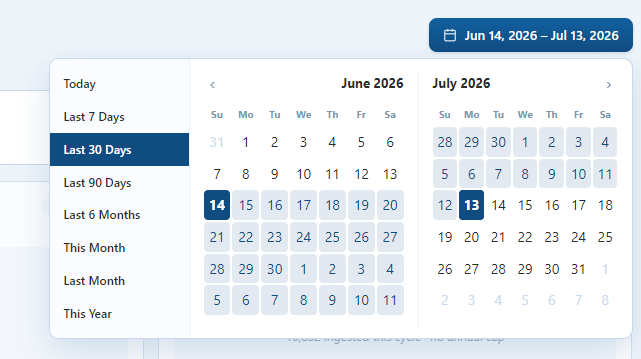
Snapshot vs. date-filtered
Snapshot widgets show what is true right now (for example invoices currently sitting in a queue). They do not change with the date picker.Date-filtered widgets summarize activity or volume inside the selected period.
Invoice / document drill-down
Where you see a magnifying-glass icon on a row, click it to open that document in Yoga.
CSV export
Download buttons export the full filtered set for that table (not only the on-screen top rows). On-screen tables are often capped (for example Top 50) for speed; the export is the complete list.
ERP wording
Labels such as “Post to Infor” or “Post to Workday” follow your tenant’s ERP configuration.
Overview
AP Leadership
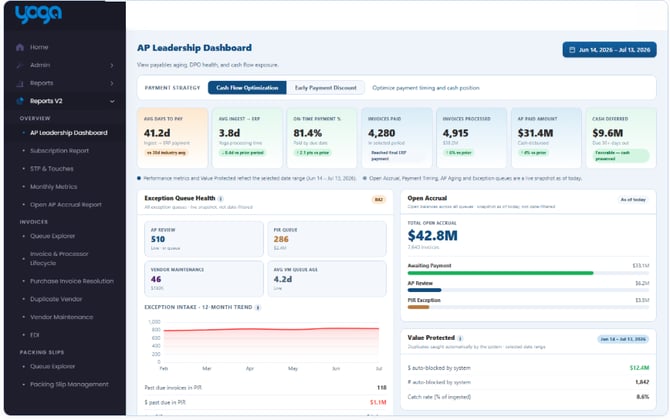
Intent
Give AP directors and finance leaders a single leadership view of payment performance, exception health, open accrual, and either cash-flow timing or early-payment discount opportunity.
Ways to use it
Start each week in Cash Flow Optimization mode to see days-to-pay, on-time payment, paid vs. processed volume, and upcoming due windows.Switch to Early Payment Discount mode when the goal is capture rate and still-available discount dollars.
Use Exception Queue Health to see live AP Review / PIR / Vendor Maintenance pressure and past-due dollars in PIR.
Use Open Accrual and Value Protected for leadership talking points on open liability and duplicate dollars blocked.
Use Vendor Distribution (Top 10) to spot concentration of invoice volume and spend in the selected period.
Technical overview
Date range: Yes (default Last 30 Days). Affects period KPIs (paid/processed, discount taken, vendor distribution, value protected). Exception queue counts and open accrual are live snapshots.Payment Strategy toggle swaps the KPI strip and lower panels:
- Cash Flow: Avg Days to Pay · Avg Ingest → ERP · On-Time Payment % · Invoices Paid · Invoices Processed · AP Paid Amount · Cash Deferred · Payment Timing buckets · AP Aging past-due buckets · Vendor Distribution.
- Discount: shared timing KPIs plus Discounts Available · Discount Taken · Discount Capture Rate · Discount Expiry Windows · Top vendors by discount opportunity.
- Note: If your Discount data is not populating, this may be due to a configuration restriction. Please discuss the integration of Discount data from your ERP with your Client Success Manager or Consulting team via yogasupport@rpic.com
- Invoices Paid — invoices the ERP finished paying in the period (can include invoices processed earlier).
- Invoices Processed — invoices that finished Yoga processing (posted / ready to pay) in the period.
- Avg Days to Pay — compared to a static industry reference (38 days).
- Discount Capture Rate — discounts taken vs. available, with a static capture target reference.
- Value Protected — dollars / counts auto-blocked as duplicates in range, plus catch rate vs. ingested volume.
Subscription Report
Intent
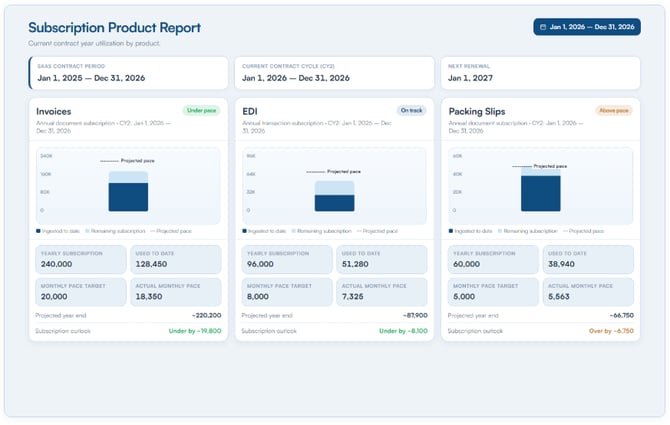
Show how your Yoga subscription volume is tracking against the current contract year allotment for metered products, including pace and renewal timing.
Ways to use it
Check used-to-date vs. annual allotment before quarterly business reviews.Compare actual monthly pace to the even-pace monthly target to see if you are ahead or behind.
Use projected year-end and outlook labels to plan renewals or expansion conversations early.
Confirm SaaS period / current cycle / next renewal dates with stakeholders.
Technical overview
Date range: Contract-year orientedTop strip: Contract cards for SaaS period, current cycle, and next renewal.
Per product card: Product name · status · yearly allotment · used-to-date · pace target (allotment ÷ 12) · actual monthly pace (used ÷ months elapsed) · projected year-end · outlook.
Active vs. inactive products: Metered products show a pace chart; inactive will show greyed out section
Back to Top
STP & Touches
Intent
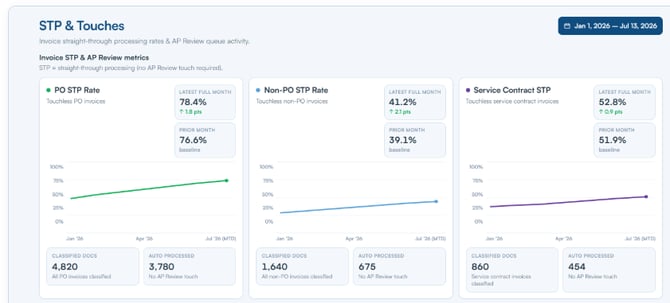
Measure how often invoices flow touchlessly to your ERP (Straight-Through Processing) versus how often they require a human touch (typically routing into AP Review), by invoice type.
Ways to use it
Track month-over-month STP for PO, Non PO, and Service Contract invoices.Use the Touches card to see which invoice types are driving AP Review work.
Pair with Vendor Maintenance / PIR reports when STP dips — those exception queues usually explain the change.
Share trend charts with operations leads when coaching processors or tuning vendor rules.
Technical overview
Date range: Yes — drives monthly rate cards and touches summary.STP rate cards: PO · Non-PO · Service Contract. Each shows current month rate, prior month, trend sparkline, classified document volume, and auto-processed volume.
STP definition (PO): Touchless PO invoices ÷ total PO invoices classified/ingested in the period. “Touchless” means the invoice did not route through AP Review, PIR, or Vendor Maintenance before posting.
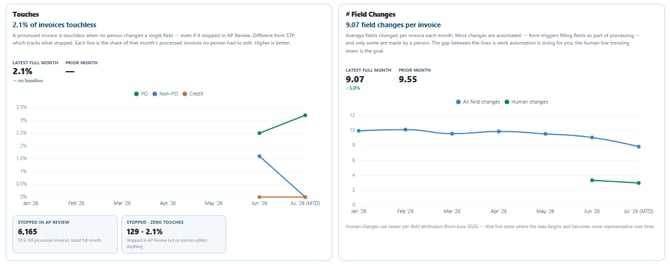
Touches card: Touch counts by type (PO, Service Contract, Non-PO, Credit) · touch rate (docs routed to AP Review ÷ total classified) · stopped / exception volume.
Touches card - Human: STP tells you whether an invoice stopped; human touches tell you whether it created work. An invoice can stop in AP Review and still be touchless — meaning it was reviewed and released without anyone editing it. Together, these show both how often automation completes invoices end-to-end and how much manual effort remains when it doesn't.
Eligibility note: Depending on tenant configuration, Non-PO / Service Contract / Credit may show as not STP-eligible (0% STP) while still contributing to touches.
Data pull: Monthly classified volume by invoice type; touchless vs. touched outcomes from routing history; AP Review routing events for the touches rate.
Back to Top
AP Accrual Report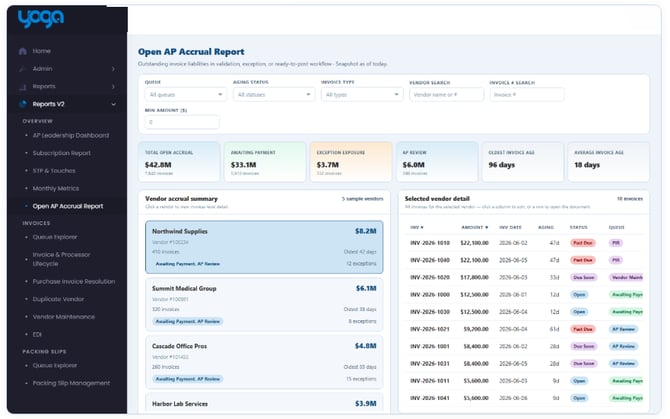
Intent
Provide a today snapshot of open AP liability still sitting in Yoga — by vendor and by invoice — so finance can accrue accurately and prioritize aging or exception dollars.
Ways to use it
Run at month-end close for open accrual totals and oldest/average age.Filter to Exception exposure (PIR + Vendor Maintenance) when explaining risk in the accrual.
Click a vendor on the left to focus invoice detail on the right.
Export CSV for auditors or ERP accrual workpapers.
Search by vendor or invoice # when validating a specific accrual line.
Technical overview
Date range: None — always “as of now.”KPI strip: Total Open Accrual · Awaiting Payment · Exception Exposure (PIR + VM) · AP Review · Oldest Invoice Age · Average Invoice Age.
Filters: Queue · Aging Status · Invoice Type (PO, Non-PO, Service Contract, Credit) · Vendor search (name or #) · Invoice # · Min Amount ($).
Layout: Left vendor accrual summary (top vendors) · right invoice detail with drill-down.
Invoice detail fields: Vendor # · Vendor Name · Invoice # · Invoice Date · Amount · Type · Queue · Status (Past Due / Due Soon / Open) · Aging Days · Reason Code · Vendor Location (when captured).
Export: Full filtered invoice detail CSV.
Data pull: Current open documents (not Cancel / Duplicate / Complete / Paid / Archive style terminal queues), rolled up by vendor and listed at invoice grain with queue and aging status.
Back to Top
Invoice & Processor Lifecycle
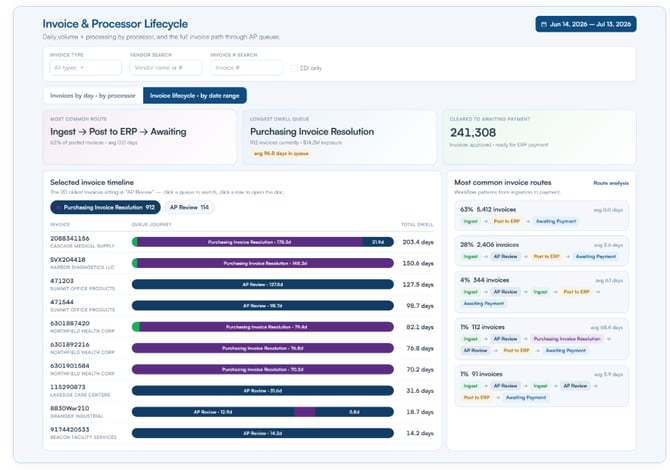
Intent
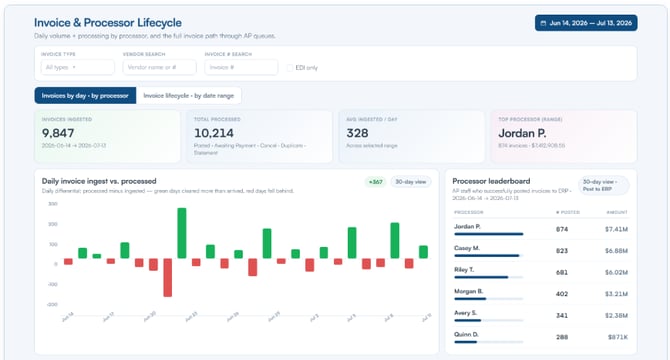
Explain throughput and ownership: how many invoices were ingested vs. cleared each day, who posted them, and which multi-queue paths invoices commonly take.
Ways to use it
Invoices by day · by processor: Use the diverging daily chart to see whether you cleared backlog (green / net positive) or added backlog (red / net negative). Use the processor leaderboard for coaching and staffing.Export processed invoice detail when validating who successfully posted the final version of an invoices to ERP.
Invoice lifecycle · by date range: Search a vendor or invoice to see queue dwell as a timeline (Gantt). Use “most common routes” to find systematic exception paths.
Export invoice history (including per-queue steps) for root-cause reviews.
Technical overview
Invoices by day · by processor date range: Under the title — drives daily differential, leaderboard, and processed detail.Daily processing differential: Outflow − ingest per day. Outflow includes routes to ERP / Cancel / Duplicate style terminal outcomes.
Processor leaderboard: Processors who successfully posted invoices to the ERP .
Processed detail fields: Processed Date · Processor · Vendor · Invoice Type · Invoice Date · Amount · Status · Vendor # · document drill-down.
Invoice lifecycle · by date range: Timeline queue chips · Gantt segments (queue + days) · most common routes (% of path + avg days) · invoice history with workflow path.
History export fields: Invoice identifiers · workflow path · plus per-step rows (Queue step · Dwell time · Assigned processor · Doc ID).
Data pull: Daily ingest and outflow from document/routing history; processor attribution from the final successful post event; lifecycle paths from ordered queue dwell segments.
Back to Top
Purchase Invoice Resolution (PIR)
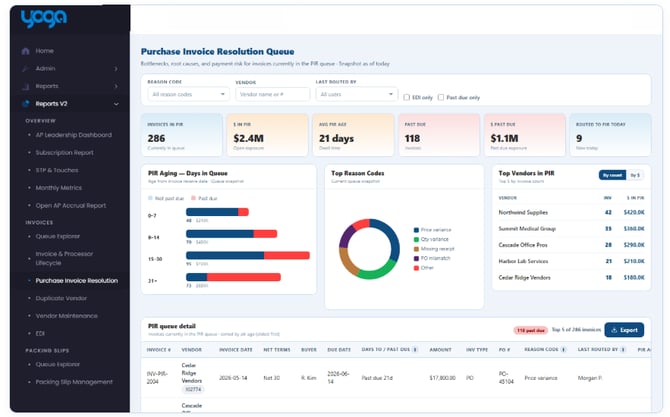
Intent
Manage the PIR exception queue: what is stuck, why, how old it is, which vendors dominate, and how productive the team was clearing PIR.
Ways to use it
Start with snapshot KPIs — especially Past Due count/$ and Avg PIR Age — for today’s triage huddle.Use aging bars to pull oldest / past-due work first.
Click reason-code or vendor widgets to focus the detail table.
Review User Productivity (last 30 days) for staffing and coaching.
Export queue detail for buyer follow-ups (reason, PO, last note).
Technical overview
Snapshot (not date-filtered): KPIs · PIR Aging · queue detail table.Date-filtered widgets: Top PIR Reason Codes (with $) · Top Vendors in PIR (Top 5; toggle count vs. $).
KPIs: Invoices in PIR · $ in PIR · Avg PIR Age · Past Due · $ Past Due · Routed to PIR Today.
Filters: Reason · Vendor · Buyer · Processor · Terms · Past Due.
Queue detail fields: Invoice # · Vendor / Vendor # · Invoice Date · Net Terms · Buyer · Due Date · Days to Due · Amount · Type · PO # · Reason · Processor (last routed by) · PIR Age · SLA · Last Note · Vendor Location · document drill-down.
User Productivity fields: Date · User Name · Docs Processed · Avg Queue Age (exportable).
Data pull: Live PIR-queue documents for snapshot widgets; period routing into PIR for “routed today” and trending reason/vendor widgets; productivity from processor activity clearing PIR.
Back to Top
Duplicate Vendor
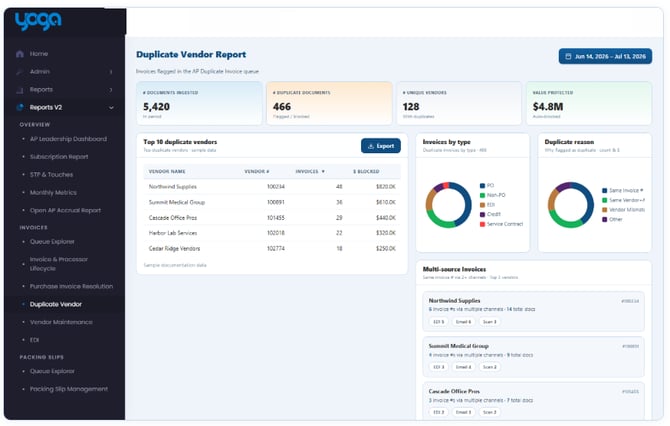
Intent
Quantify duplicate invoice prevention: how many duplicates were caught, dollars protected, which vendors and reasons drive duplicates, and which invoices arrive through multiple channels.
Ways to use it
Report Value Protected in leadership updates.Investigate Top 10 vendors generating duplicates — often a supplier process or portal issue.
Use reason pies (Same Invoice #, Same Vendor+Amount, Vendor Mismatch, etc.) to tune controls.
Review Multi-source Invoices when the same invoice number arrives via EDI/email/scan/manual.
Technical overview
Date range: Yes — drives KPIs, vendor table, charts, and export scope.KPIs: # Documents ingested · # Duplicate Documents · # Unique Vendors · Value Protected.
Widgets: Top vendors table · Invoices by Type pie · Duplicate Reason pie · Multi-source vendor list (channels such as EDI, Email, Scan, Manual).
Export columns (duplicate invoices in period): Vendor # · Vendor Name · Invoice # · Invoice $ · Invoice Type · Duplicate Reason.
Data pull: Ingested documents in range; documents flagged/blocked as duplicates; reason and type classifications; multi-channel matches on shared invoice numbers.
Back to Top
Vendor Maintenance
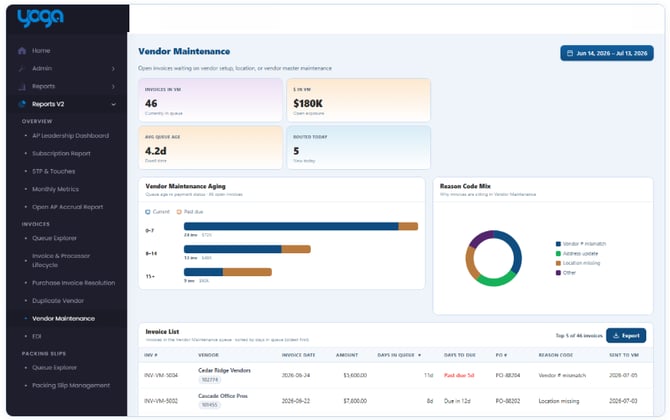
Intent
Operate the Vendor Maintenance exception queue — invoices waiting on vendor master / vendor data fixes — including aging, reasons, and processor productivity.
Ways to use it
Clear high-aging and past-due VM invoices before they become accrual or payment risk.Use reason mix to spot systemic vendor-data problems (address, location, vendor #, etc.).
Track User Productivity the same way you do for PIR.
Drill into invoices and coordinate with vendor master owners.
Technical overview
Date range: Yes — influences period-oriented widgets / productivity context; queue detail is the live VM queue.KPIs / aging / reasons: Parallel pattern to other exception reports (counts, $, aging buckets, reason mix).
Invoice detail fields: Invoice # · Vendor / Vendor # · Invoice Date · Amount · Days in Queue · Days to Due · PO # · Reason · Sent to VM · Vendor Location · document drill-down.
User Productivity: Date · User · Docs Processed · Avg Queue Age (CSV export).
Export: Full invoice list for the filtered VM set.
Data pull: Live Vendor Maintenance queue documents; reason codes and due-date urgency; productivity from users clearing VM.
Back to Top
EDI
Intent
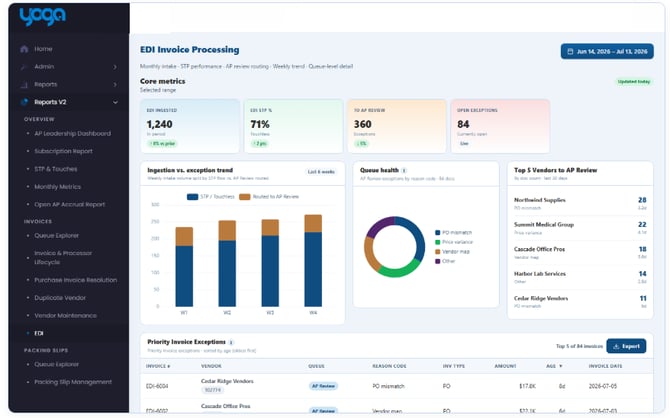
Monitor EDI invoice automation health: ingestion vs. exception trend, why EDI invoices fall to AP Review, which vendors are noisy, and which priority exceptions need attention.
Ways to use it
Watch weekly STP vs. AP Review mix after EDI onboarding or mapping changes.Use Top Vendors to AP Review (doc count, top reason, avg age) to prioritize supplier outreach.
Work the Priority Invoice Exceptions table daily; export CSV for EDI analyst queues.
Enablement note: this report is intended for tenants with EDI invoice volume (feature availability may vary).
Technical overview
Date range: Yes — under the title.Layout: Ingestion vs. exception trend · queue health / reason mix · Top 5 vendors to AP Review · priority exceptions table.
Top vendor fields: Vendor name · Doc count · Top Reason Code · Avg Age.
Exception detail fields: Invoice # · Vendor / Vendor # · Queue · Reason · Type · Amount · Age · Invoice Date · Vendor Location · document drill-down.
Export: Priority exceptions CSV for the filtered set.
Data pull: EDI-sourced invoices in range; routing outcomes (touchless vs. AP Review); reason codes; current exception-aged EDI documents.
Back to Top
Packing Slip Management
Intent
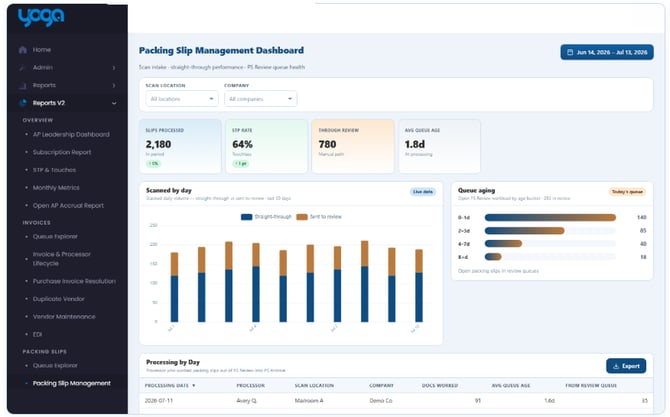
Track packing-slip processing performance by day — who worked slips, from which scan location / company, how old the queue was, and how much came through review.
Ways to use it
Review daily throughput after mailroom / scan changes.Filter by Scan Location or Company when comparing sites.
Use Avg Queue Age and From Review counts to spot review bottlenecks.
Pair with Packing Slip Queue Explorer when you need the live queue, not just daily productivity.
Technical overview
Date range: Yes.Filters: Scan Location · Company (no Day Type filter).
KPIs + charts: Period processing summary, daily STP vs. review mix, aging buckets for slips in scope.
Processing by Day fields: Date · Scan Location · Company · Processor (user who moved the slip from Packing Slip Review → Packing Slip Archive) · Docs Processed / Docs Worked · Avg Queue Age · From Review Queue (count).
Data pull: Packing-slip processing events in range; scan location and company attributes; processor identity from the review-to-archive transition; queue age at processing time.
Back to Top
Receipt Management
Intent
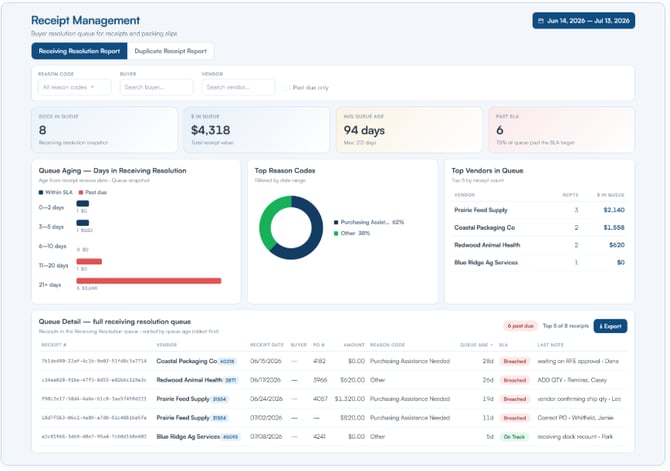
Support receiving teams (where enabled with Line Level Packing Slips) with Receiving Resolution and Duplicate Receipt views — focused on receipt counts and reasons rather than invoice dollars.
Ways to use it
Receiving Resolution tab: Clear the live receiving-resolution queue; filter by reason, buyer, or vendor; export worklists for buyers.Duplicate Receipt tab: Investigate duplicate receipt flags and reason mix; click the reason pie to filter the detail table.
Enablement note: typically available for tenants using receipt workflows.
Technical overview
Receiving Resolution- Snapshot KPI: Docs in Queue (count).
- Date-filtered: Top Reason Codes · Top Vendors (receipt counts).
- Detail fields: REF # · Vendor / Vendor # · Receipt Date · Buyer · PO # · Reason Code · Last Note · (amount / queue age / SLA may appear depending on tenant build) · document drill-down.
- KPIs: Duplicate Receipts · Unique Vendors.
- Detail fields: Duplicate Reviewed · Duplicate Reason · Vendor · REF # · Receipt Date · PO # · document drill-down.
- Duplicate Reason pie filters the table.
Data pull: Live receiving-resolution queue documents; duplicate-receipt flags in range; reason codes and buyer/vendor/PO identifiers.
Back to Top
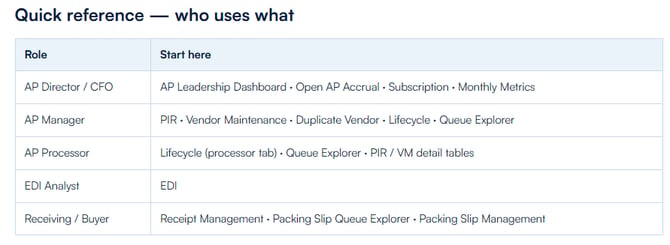
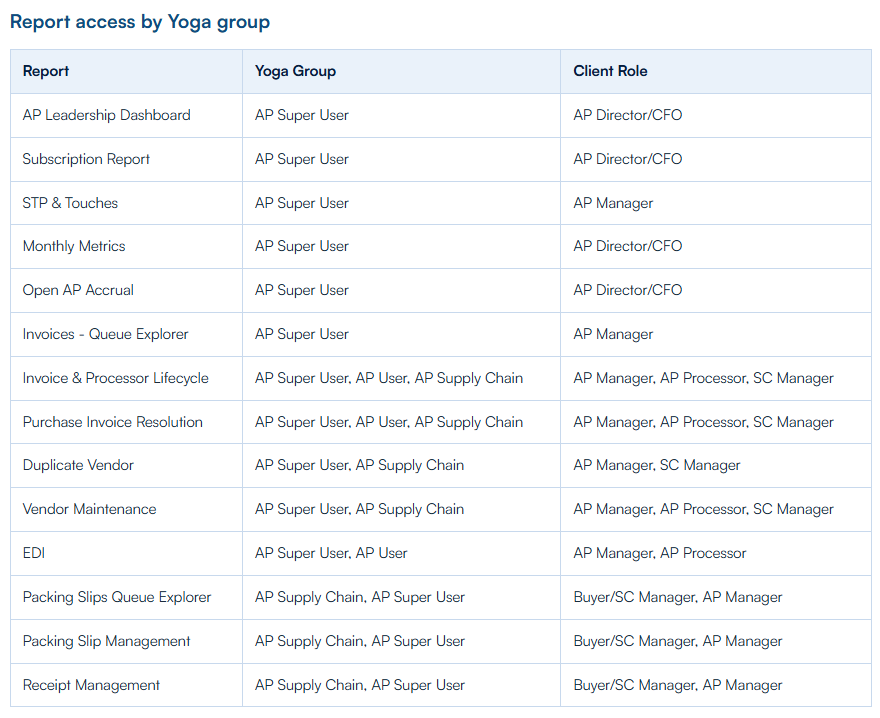
If you would like to update any report permissions for your organization, please contact YogaSupport@rpic.com
Back to TopFAQ
Why don’t some of my numbers change when I change the date picker?
Those widgets are snapshots of the live queue or open accrual. Only date-filtered widgets respond to the picker.
Why does the on-screen table say Top 50 but my CSV has more rows?
Tables are capped for interactive performance. CSV exports the full filtered result.
Why can Invoices Paid exceed Invoices Processed on the Leadership Dashboard?
Paid counts invoices the ERP finished paying in the period, including invoices Yoga processed earlier.
Why don’t I see EDI, Packing Slips, or Receipt Management?
Those reports are tenant-enabled. Ask your Yoga CSM if you expect them and they are missing from the nav.
Is this replacing older Home reports?
V2 is the unified AP analytics experience. Monthly Metrics will be moved under the new V2 reports in Q3, and the Legacy Reports will be depricated at that time.