![rpic-yoga_flexible_software-logo-color (1).png]](https://hubsupport.rpic.com/hs-fs/hubfs/rpic-yoga_flexible_software-logo-color%20(1).png?height=40&name=rpic-yoga_flexible_software-logo-color%20(1).png)

New Product Features
Product Features are integrated into our Application Code and are a part of every Yoga Production tenant.
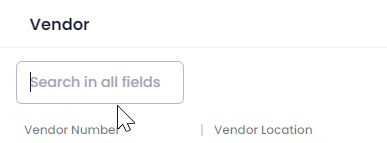
- Search All Is Back by popular demand
The Search All box has returned to lookup windows, list views, and mass-assign pickers. Type any value into the single search box above the grid and Yoga looks across every searchable column at once, so you can find a record without first deciding which column it lives in.
- Hide the Reason Codes You Don't Want to See
The reason code filter on document views now has an Exclude mode alongside the familiar Include mode. If your team wants to see everything except 1 or 2 codes, you can now select those codes and switch to Exclude, instead of hand-picking every other code in the list. Include mode works exactly as it does today and your existing saved filters keep working with no changes.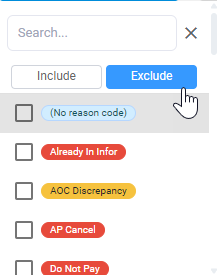
- Filtered Views Load Faster
We tuned the database behind document views for the filter and sort combinations that were slowest in day-to-day use. Heavily filtered views, and the next and previous navigation through them, now return noticeably quicker, especially for teams that keep large filters saved on their views. - Statement Automation Clients: Payment Status From Your ERP, Right on the Statements Queue
Matched statement lines now show where an invoice really sits in your ERP: Unreleased, Pending Approval, Rejected along with the reject reason, Released and Awaiting Payment, or Paid. It appears right on the line, so you can tell at a glance which invoices are settled and which are stuck without leaving Yoga. Where payment sync is configured, the check number, payment date, amount and payment status sit alongside it. All of it can be included in the emails you send vendors, so a vendor chasing an invoice gets a real answer instead of a placeholder.- Want to learn more about our newest feature: Statement Automation? Test it in your environment today - or reach out to our Client Success Team to get a customized demo!

- Want to learn more about our newest feature: Statement Automation? Test it in your environment today - or reach out to our Client Success Team to get a customized demo!
Bug Fixes
- Approval Emails Send in Bulk
When a large batch of approval notifications went out at once, some emails were rejected by the mail service and never arrived. Yoga now paces those sends to stay within the mail service's limits and retries anything that gets held back, so approvers receive every notification. - The Assigned Processor Popup Finds People by Name
Opening the Assigned Processor lookup from a field showing someone's name returned zero results, because the typed name was being searched against the clerk ID column rather than the name column. It now searches the name column, so the person you are looking for appears. Selecting them still writes the correct ID behind the scenes. - Lookup Popups Open Clear When You Haven't Typed Anything
Clicking the magnifying glass on a field that already held a saved value opened the popup pre-filtered by that value, which often left you looking at a single row or an empty list when you wanted to browse. The popup now opens with an empty search and the full list. If you have actively typed something into the field, that text still carries into the popup search, and dependent lookups such as filtering vendor locations by vendor number are unchanged. - Packing Slip and Statement Rules Show the Right Sample Documents
When building a vendor rule for packing slips or statements, the sample document list defaulted to invoices, which made it hard to see whether the rule would work. The samples now match the document type of the rule you are creating, so packing slip rules show packing slips and statement rules show statements.
Upcoming Releases
Planned Features for upcoming releases; timing may shift based on testing and feedback
- Statement Automation Feature Improvements
For clients using Statement Automation, including trial environments, the next wave of statement work is in testing.- Confirm, resolve, and archive flow will move finished statements out of your working queue. Duplicate detection will flag when the same statement, or the same invoice across statements, has already been handled. Statement-specific reason codes and routing will match the work in front of you. Statement lines will clean invoice and PO numbers the way your invoices do, so more lines match on the first pass. And the background sweep that re-checks unmatched lines is being rebuilt to react to changes rather than wait for its next scheduled run.
- Vendors Hear Back Automatically on Fully Matched Statements
When every line on a statement matches automatically, Yoga will email the vendor the current status of each invoice, with no AP touch needed. - Statement Accruals Posted to Your ERP in Real Time
Accruals on statement lines will be created, posted, and kept in sync with Infor automatically, replacing the manual flag that lives only in Yoga today. A proof of concept is underway.
- Vendor Rules for EDI Invoices
We are extending vendor rules to cover EDI invoices, so rule administrators can work with EDI data alongside the rules they build today. - Straight-Through Processing for Blanket PO Invoices
We are looking at where blanket PO invoices can safely skip manual review, starting with the most clear-cut matches. Everything else keeps routing to AP Review as it does today. - Faster Data Entry in AOC Popups
Improvements to how AOC information is entered and matched, aimed at cutting down scrolling and manual lookup. - More From Your Reports
A round of refinements to the Invoice and Processor Lifecycle reports, shaped by feedback from AP managers who work in them every week. - Document Classification- Yoga Add-on
Continued work on the model that sorts and classifies your incoming documents, focused on accuracy and readiness for wider production use. - Customer Service Agent-Yoga Add-on
Vendors email your AP inbox asking whether an invoice arrived, whether it is approved, and when it will be paid. The Customer Service Agent is being built to handle those routine inquiries directly and to pass anything it cannot answer to your AP team with the context already gathered.
Conclusion
Thank you for being a valued Yoga Software and RPI Client, and for providing us your valuable feedback. To review past release notes, please visit the release notes section in RPI's Yoga Knowledge Base.