![rpic-yoga_flexible_software-logo-color (1).png]](https://hubsupport.rpic.com/hs-fs/hubfs/rpic-yoga_flexible_software-logo-color%20(1).png?height=40&name=rpic-yoga_flexible_software-logo-color%20(1).png)
Download Full Reports and Views Without Limits
When downloading a report or documents from a view, users will now see a new “Send to My Email” option alongside the existing Download to Excel option.
The traditional Download to Excel option continues to work as it does today and is best for smaller datasets. The new Send to My Email option is designed for larger exports and removes previous row limits by running the download in the background and delivering the full file by email once it’s ready.
This gives users flexibility to choose the best option based on the size of the data they need—quick downloads for smaller exports, or full datasets delivered by email for larger ones.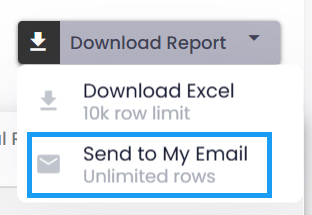
Status Column Filter on Document Views
Yoga now allows users to filter documents by status directly from the Status column within document views.
The Status column includes a dropdown filter that lets users quickly narrow results to Alert, On Hold, or Locked documents. This makes it easier to focus on items that need attention and organize work more efficiently—without manually scanning the full list.
The filter behaves consistently with other column filters in Yoga and is available anywhere the Status column appears.
Improved Document Notes Visibility
When reviewing documents in Yoga, Document notes now have their own scrollbar and will remain fixed while you scroll through the form.
The Notes panel is pinned in place and scrolls independently, making it easy to reference comments, questions, and history without losing your place. This allows users to stay oriented and collaborate more effectively while working through longer documents.
Configurable Email Signatures
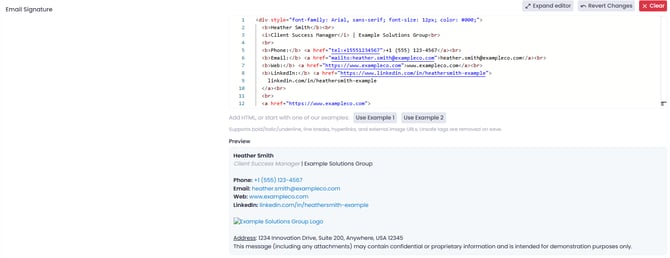
Yoga now allows users to configure a personal email signature for emails sent from within the application.
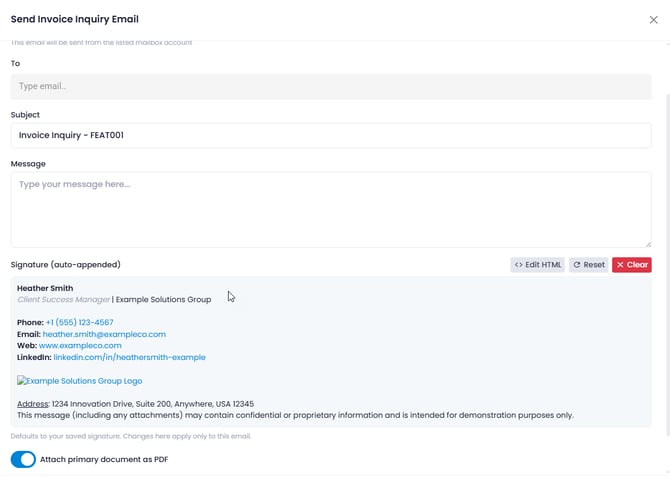
Users can define their signature directly in User Preferences, including formatted text, links, and branded contact information. When sending an email from Yoga, the signature is automatically added to the bottom of the message. Users can still edit or remove the signature before sending if needed.
Email signatures are saved per user and per tenant, ensuring the correct signature is used when working across multiple environments.
This enhancement helps ensure outgoing emails are professional, consistent, and branded—without the need to manually re-enter signature details each time.
Keyboard Shortcuts Visibility Improvement
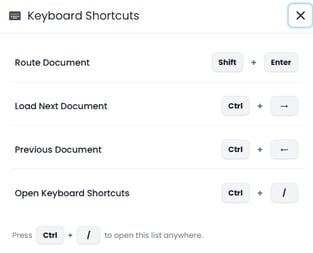
Yoga now provides a quick reference for available keyboard shortcuts directly within the application. Users can access the Keyboard Shortcuts list from the user profile/help menu or by pressing Ctrl + / from anywhere in Yoga.
This makes it easier to discover and use shortcuts for faster navigation and document routing, with no changes to permissions or functionality.
Bug Fixes
Fix: Missing Scrollbar in Grid Views
We resolved an issue where the vertical scrollbar could disappear on grid-based views when using lower browser zoom levels or high-resolution displays.
In some cases—such as viewing Yoga on a 4K monitor or reducing browser zoom—only the initial set of records would appear, preventing users from scrolling to load additional results. Scrolling now behaves as expected across screen resolutions and zoom settings, ensuring all records in a view remain accessible.
Conclusion
Thank you for being a valued Yoga Software and RPI Client, and for providing us your valuable feedback. To review past release notes, please visit the release notes section in RPI's Yoga Knowledge Base.