![rpic-yoga_flexible_software-logo-color (1).png]](https://hubsupport.rpic.com/hs-fs/hubfs/rpic-yoga_flexible_software-logo-color%20(1).png?height=40&name=rpic-yoga_flexible_software-logo-color%20(1).png)

New Product Features
Product Features are integrated into our Application Code and are a part of every Yoga Production tenant.
-
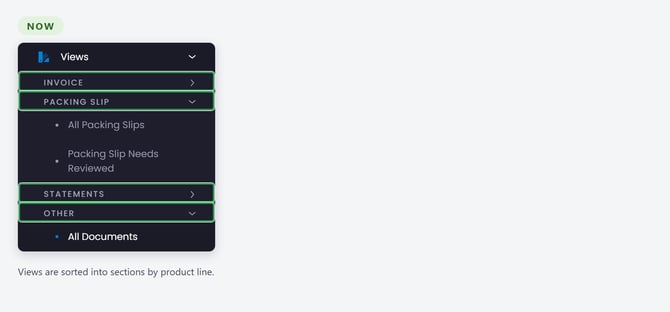
Views Are Grouped by Product Line in the Left Menu
If your team works in more than 1 product line, the Views menu on the left used to be a single alphabetical list with invoice, packing slip and statement views mixed together. Views are now grouped into sections by product line: Invoice, Packing Slip and Statements. Each section opens and closes on its own, so you only see the views for the work in front of you. When you open a view near the bottom of the menu, the menu also keeps its place instead of jumping back to the top.
-
Emailed Invoices Keep Their Layout in the Supporting PDF
When an invoice arrives by email, Yoga saves the message itself as a supporting PDF next to the invoice. Some of those PDFs came through with stretched pages, broken tables or missing text, so the vendor's note was hard to read. Yoga now builds that PDF the way a web browser shows the email, so tables, spacing and text look like the original message. This applies to every email intake. If the new method is ever unavailable, Yoga falls back to the old one, so no email fails to come in.
Clear an Invoice's Alert Without Reprocessing It
When Yoga flags a document with an alert, the "!" shows next to it in your list views. Clearing it used to mean re-posting the invoice or running the read again. Now the alert shows in the document's header, with a Clear alert button. Anyone who can edit the document can clear it, and each clear is saved to the document's history, so you can see who cleared it and when.
Opt-In Features
Some features are available upon request. Please submit a request to YogaSupport@rpic.com asking your support team to configure it in your environment.
-
Clear Alerts on Many Documents at Once
For teams that work through alerts in volume. A Clear Alert action can be added to your list views and statement views, so you can select several documents and clear their alerts in 1 step instead of opening each one. Each clear is still saved to that document's history. If you are interested, reach out to your Client Success team with a ticket to Yoga Support.
-
Utility Bills With a Past-Due Balance or Late Fee Can Stop for Review
For clients whose utility bills are coded automatically. A utility bill can carry a past-due balance, a credit or a late fee, so the amount due does not match the current charges. Yoga can now hold those bills in AP Review instead of sending them through, so your team decides what to pay. It can also take the invoice amount straight from the amount printed on the bill. This can be set up for specific utility vendors or for all of them. If you are interested, reach out to your Client Success team with a ticket to Yoga Support.
-
Service Contract Invoices Fill In Their Routing Category
For clients who pair invoices to service contracts. PO invoices already take their Invoice Routing Category from the GL on the paired PO line. Contract invoices can now do the same from the paired contract line, including contract lines with hyphenated project numbers. When no contract line matches, the field is left for your team to fill in instead of stopping with an error. If you are interested, reach out to your Client Success team with a ticket to Yoga Support.
-
Users in More Than 1 Directory Group Can Keep Every Role
For clients whose Yoga users sync from your company directory. When a person belonged to more than 1 mapped directory group, the sync gave them only the Yoga access of the first group they matched, so an extra role such as an added approval role was dropped. A directory group can now be marked as an add-on: anyone in it gets its Yoga access on top of their main role. Leaving the add-on group removes only the access it gave. Groups that are not marked work as before. If you are interested, reach out to your Client Success team with a ticket to Yoga Support.
Bug Fixes
- Repeated Items on a PO Pair to the Line with the Matching Quantity
When a PO orders the same item on more than 1 line with different quantities, Yoga paired every invoice line to the first of those PO lines. The invoice still balanced, so it could post on the wrong line, where your ERP rejected the match without any alert in Yoga. Yoga now picks the PO line with the same quantity, or the same amount when no quantity matches. When neither points to 1 line, it pairs to the first line as before. Invoices already posted are left as they were. - Backordered Lines Printed at Quantity 0 Stay Unpaired
Some vendors print backordered items as lines shipped 0 at $0.00 next to what they billed. Yoga paired those lines to their PO lines too, so an invoice could go straight through and then come back to AP Review at export with "Invalid PO Line Qty." A line printed with quantity 0 and no amount now stays on the invoice unpaired and doesn't count against the invoice, so the rest of it can go through. Invoices already posted are left as they were. - Active Directory Sync Treats People Added by Hand Like Everyone Else
For clients who sync users from Active Directory. People added by hand in User Manager were saved without a setting the sync reads, so the sync never turned them off, even when they were in none of your directory groups. They were also left out of email recipient suggestions. The sync now treats them like everyone else, and they show in suggestions. To keep someone who is not in your directory groups, check Exclude from AD Sync on their user. We marked the people already added by hand this way, so nobody lost access with this change.
Upcoming Releases
Planned Features for upcoming releases; timing may shift based on testing and feedback
- A Smarter Duplicate Check
We are upgrading the duplicate check so it catches the same invoice when the number is written differently, sent again, or filed under another vendor, including copies that already posted. It will also stop flagging credit memos and pairs your team has already cleared, so every flag is worth opening. - Packing Slip Exceptions Report
For clients using Yoga for packing slips. A new report will show why packing slips and receipt lines stop, which checks held them, and how much of the work vendor rules and Yoga's learning take over, so you can track manual work going down over time. - EDI Image Invoices in Reports
For clients whose EDI invoices go to the ERP as images. Those invoices will show up in Reports with the rest of your invoices, so you can count and filter them and see them in your end-to-end processing and payment numbers. - Vendor Rules for EDI Invoices
We are extending vendor rules to cover EDI invoices, so rule administrators can work with EDI data alongside the rules they build today. - Document Classification, Yoga Add-on
Continued work on the model that sorts and classifies your incoming documents, focused on accuracy and readiness for wider production use. - Customer Service Agent, Yoga Add-on
Vendors email your AP inbox asking whether an invoice arrived, whether it is approved, and when it will be paid. The Customer Service Agent is being built to handle those routine inquiries directly and to pass anything it cannot answer to your AP team with the context already gathered.
Conclusion
Thank you for being a valued Yoga Software and RPI Client, and for providing us your valuable feedback. To review past release notes, please visit the release notes section in RPI's Yoga Knowledge Base.