![rpic-yoga_flexible_software-logo-color (1).png]](https://hubsupport.rpic.com/hs-fs/hubfs/rpic-yoga_flexible_software-logo-color%20(1).png?height=40&name=rpic-yoga_flexible_software-logo-color%20(1).png)

New Product Features
Product Features are integrated into our Application Code and are a part of every Yoga Production tenant.
-
The Vendor Page Opens on the Vendor's Fields and Shows Who Changed What
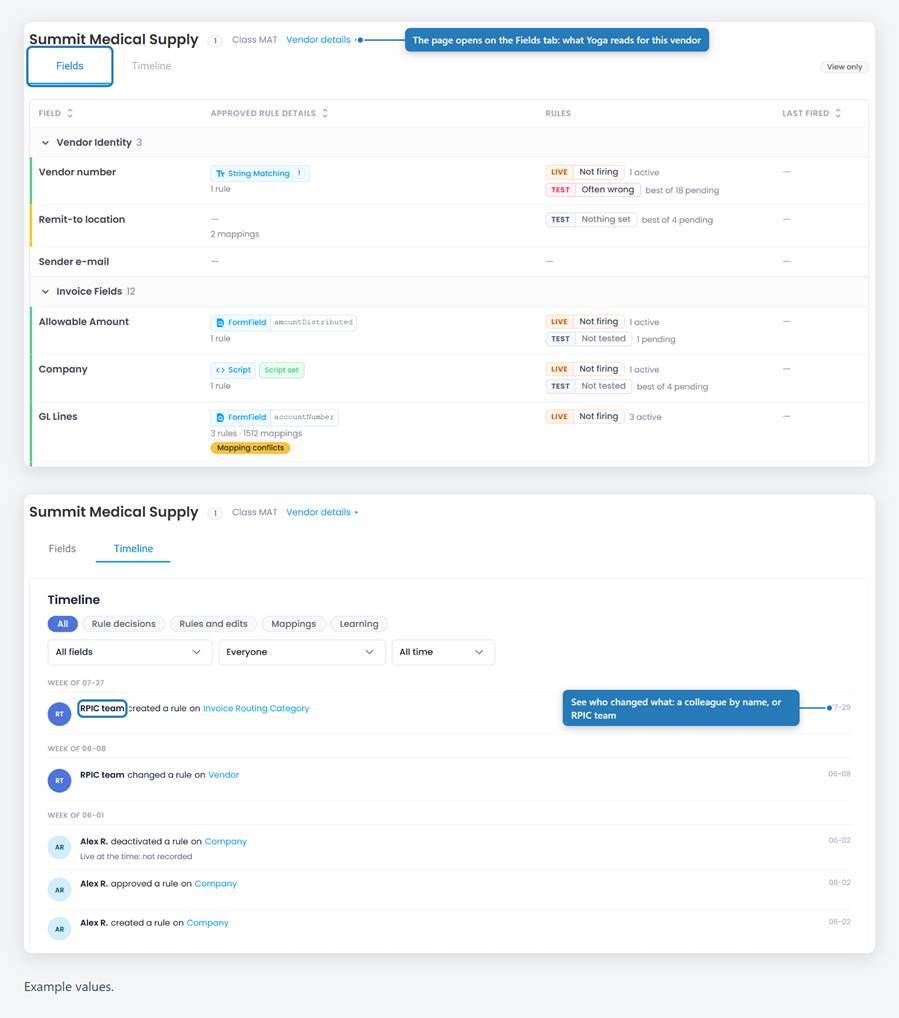
If your team uses Vendor Management, a vendor's page now opens on the fields Yoga reads for that vendor, with Packing Slip and Statement sections when you use those products. A new Corrections tab replaces Field Changes, and a Timeline shows who changed what for the vendor. Every change is credited to one of your colleagues, "RPIC team", "Yoga Learning" or "Not recorded", instead of a system account. Users who can see vendors but not edit them get a read-only view of the same page.
Records Started From a Capture Page or CSV Upload Show Their Starting Values
When your team creates a record from a Capture Page or a CSV upload, its values are in place from the start, so Form Changes showed nothing until someone edited it later. Form Changes now records the starting values as 2 entries: what the user entered, and what the form filled in by default. Both are credited to the person who started the capture or upload, so if a value is ever questioned you can see what was first submitted. These entries never count as corrections in your reports. Records created before this release are not filled in.
Invoices Are No Longer Marked as Credits Because of a Credit Memo Label
Some vendors print a credit memo label on ordinary invoices: an empty "Credit Memo #" column, a note that credits will be issued separately, or a "Credit Memo:" heading. Yoga read those labels as a credit, set the invoice type to credit, and your team had to change it back. Now a positive invoice is typed as a credit only when the page shows real credit evidence, such as a credit memo title, a numbered credit memo or an amount marked CR. Invoices already processed are not changed.
Vendor Rules Now Work on EDI Invoices
Vendor rules can now be built for invoices that arrive by EDI. An EDI invoice has no printed page for Yoga to read, so a remit rule had nothing to match on; now a rule can match on values from the EDI file itself, such as the bill-to ID. Any remit or field rule can also be limited to EDI invoices only, or to everything except EDI invoices. The rules you already have keep working as they do today. The new EDI values appear on EDI invoices received from November 17 on.
Reports Open Faster and Fill In Card by Card
Report pages used to show a single loading screen until the slowest part of the page was ready. Now each card fills in as soon as its own data is ready, across all 13 reports. If a card cannot load, only that card shows an error with a Retry button, and the rest of the page stays usable. Changing a filter dims each card until it refreshes, and re-sorting a table reloads only that table. The Invoice & Processor Lifecycle report also opens about 1 to 2 seconds faster.
Opt-In Features
Some features are available upon request. Please submit a request to YogaSupport@rpic.com asking your support team to configure it in your environment.
-
Review the Mappings Yoga Learns Before They Apply
For teams with Vendor Management users who want to review what Yoga learns. Learned rules already wait for approval, but the mappings Yoga learned for them applied to invoices right away, so a pattern shared by a few invoices that arrived together could spread before anyone saw it. With this option on, every mapping Yoga learns waits in Pending Mappings, with how many invoices it matched and examples, until someone on your team approves it. Approving a learned rule also approves the mappings held for it. If you are interested, reach out to your Client Success team with a ticket to Yoga Support.
Bug Fixes
-
Lines Built From an Open PO Line Carry That Line's Quantity and Unit Cost
When Yoga built an invoice line from an open line on the PO, it always used a quantity of 1 at the full amount, even when the PO line itself was, for example, 4 at $32.00. Your ERP then could not match the invoice to the PO. These lines now carry the PO line's own quantity and unit cost whenever they add up to the line amount. Invoices processed before this fix are not changed.
Upcoming Releases
Planned Features for upcoming releases; timing may shift based on testing and feedback
- A Smarter Duplicate Check
We are upgrading the duplicate check so it catches the same invoice when the number is written differently, sent again, or filed under another vendor, including copies that already posted. It will also stop flagging credit memos and pairs your team has already cleared, so every flag is worth opening. - Packing Slip Exceptions Report
For clients using Yoga for packing slips. A new report will show why packing slips and receipt lines stop, which checks held them, and how much of the work vendor rules and Yoga's learning take over, so you can track manual work going down over time. - EDI Image Invoices in Reports
For clients whose EDI invoices go to the ERP as images. Those invoices will show up in Reports with the rest of your invoices, so you can count and filter them and see them in your end-to-end processing and payment numbers. - Document Classification, Yoga Add-on
Continued work on the model that sorts and classifies your incoming documents, focused on accuracy and readiness for wider production use. - Customer Service Agent, Yoga Add-on
Vendors email your AP inbox asking whether an invoice arrived, whether it is approved, and when it will be paid. The Customer Service Agent is being built to handle those routine inquiries directly and to pass anything it cannot answer to your AP team with the context already gathered.
Conclusion
Thank you for being a valued Yoga Software and RPI Client, and for providing us your valuable feedback. To review past release notes, please visit the release notes section in RPI's Yoga Knowledge Base.