![rpic-yoga_flexible_software-logo-color (1).png]](https://hubsupport.rpic.com/hs-fs/hubfs/rpic-yoga_flexible_software-logo-color%20(1).png?height=40&name=rpic-yoga_flexible_software-logo-color%20(1).png)

New Product Features
Product Features are integrated into our Application Code and are a part of every Yoga Production tenant.
- User Productivity and Step-by-Step History in the Invoice & Processor Lifecycle Report
The Invoice & Processor Lifecycle report in Reports has the User Productivity view you know from the legacy Overview report. A User Productivity table sits under the processed invoice detail, with 1 row per date and user showing the route actions that posted to your ERP and total route actions. Click a row to see each route action and the time it was routed, filter the table by processor, and export every row. The processed invoice detail and its drill-ins show the Invoice #, and the on-screen detail table lists the top 20 invoices while the export still includes all of them. The exports carry more detail too: the processed invoice export has a Processed Time column, and the invoice history export has a post time column and a 2nd sheet, Lifecycle Steps, with 1 row per routing step showing the from and to queue, processor, timestamp, and time in queue. Invoices that Yoga posts automatically are credited to Yoga System instead of a person, so the Top processors leaderboard reflects your team's own work.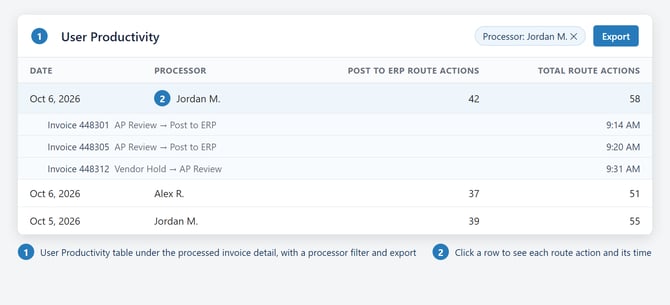
- Routing from the Form Always Saves First
When you route an invoice that has unsaved changes, you now get 2 choices: Save and Route, or Return to doc. Save and Route saves the form, runs the form checks, and routes the invoice. If a required field is blank, the save stops and the invoice stays where it is. Return to doc, or closing the dialog, keeps your edits without routing. The Route without Saving option is gone for every client, because invoices routed that way skipped the form checks and caused problems downstream. Hotkey, reason-code, and bulk routing work as before.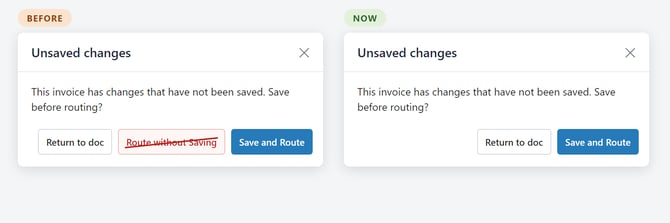
- PO Line Price Differences Stay Paired for Review
When an invoice line pairs to a PO line but the unit price differs from the PO by more than your tolerance, the line now stays paired at the invoice price and the invoice holds for review, with a message naming the PO line and both prices. Before, Yoga unpaired the line with a Unit Cost Mismatch, and processors re-paired 90% of them to the same PO line. Common read errors now settle on their own: a blank or $0 unit price fills in when the math agrees, a per-each line against a per-pack PO line is restated in the PO's units, and a blank price on an invoice that balances is no longer held. Service lines billed at a different price still unpair, and $1 and $0 placeholder PO lines are handled as before.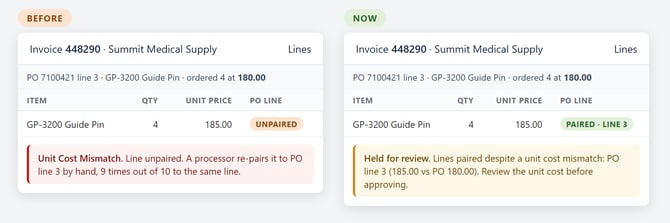
- Field Changes on STP & Touches Count Only the Changes a Person Made
On the STP & Touches report, the # Field Changes card used to plot every field change, including the ones Yoga's own automation filled in, beside the changes your team made. It now shows only the changes a person made, with 1 line per invoice type (PO, Non-PO, Service Contract, and Credit), the same way the Touchless card reads, and a toggle lets you view all types, the overall line, or a single type. Because automated changes no longer count, the headline number reads lower than before; it is now the number of fields your team actually touches per invoice.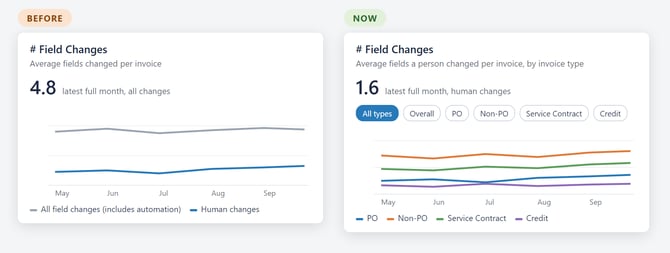
Opt-In Features
Some features are available upon request. Please submit a request to YogaSupport@rpic.com asking your support team to configure it in your environment.
- Smarter Packing Slip Reading That Learns Each Shipper's Vendor
For clients using Yoga for packing slips. Yoga now reads packing slips with the same engine it uses for invoices. It confirms the PO on the slip against your purchase orders, fills in the vendor and company from that PO, and learns each shipper's vendor from the slips your team has already finished. A slip that was already received is held as a duplicate, and any slip that cannot go straight through tells you why. If you are interested, reach out to your Client Success team with a ticket to Yoga Support.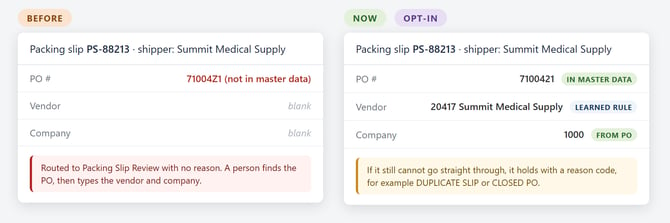
Bug Fixes
- Service Contract Lines Added from View Contract Lines Start at a Quantity of 1
Service contract lines added through View Contract Lines were arriving with a blank quantity and a $0 extended amount, so someone had to type a quantity before the line was valid. New lines now start at a quantity of 1 with the extended amount filled in, and you can change the quantity as before. The start at 1 is deliberate: the contract's maximum quantity is no longer copied in, because on most contracts that number is the ceiling, not the amount being invoiced. - Percent Column Headers Are No Longer Read as a Charge
Yoga was reading a column header that names a percentage, such as "Unit Price / Discount %" or "Tax %", as a charge, so an invoice could pick up a Discount or Tax line it did not have and sometimes lose its real freight. Percent headers are now skipped, while labels that print a rate beside a dollar amount, such as "Sales Tax (6.0%)", are still read. The same fix stops a charge from posting twice, stops dates and ZIP codes being read as freight, and keeps any charge a vendor rule already set; the rule wins if they disagree. - Extraction Rules for Statements and Packing Slips Save Again
Approving, declining, or editing a vendor extraction rule scoped to Statements or Packing Slips showed a success message but saved nothing, so the rule sat in Pending and never ran. Both the vendor page and the Vendor Rules Command Center now save these rules. A rule still sitting in Pending only needs to be approved again. Rules for all products were never affected. - Emailed Invoices Are No Longer Stranded Without a Queue
Occasionally an emailed invoice was turned into a document that never reached its starting queue, so no view or workflow could find it, and the whole email was moved to the Yoga Error folder. Yoga now retries the routing, and a document that still cannot be routed lands in a review queue with an alert instead of disappearing. The email is archived normally. - Vendor Rules Built on a 2-Line Label Now Apply
A vendor rule built on a label the invoice prints across 2 lines, such as a total label that wraps, never applied, so about 2 dozen approved rules across client sites were silently doing nothing. Those rules work now, with no change on your side. 2 related fixes ship with it: a blank copy of a label no longer hides the filled one, and 2 amounts stacked on separate lines are no longer run together into 1 wrong number; when a rule cannot read exactly 1 number, it leaves the field for review. - Supporting Documentation PDFs From Vendor Emails Paginate Normally
Some vendor emails were turned into supporting documentation PDFs with 1 character per line, so a 2 or 3 page email came out as 63 pages nobody could review. The conversion now handles the email layout that caused it, so these emails read normally. The invoice itself was always read correctly; only the supporting document was affected. - The Mapping Step Is Available on Every Lookup-Field Rule
For teams that build their own vendor rules. Rules on lookup fields such as Ship To Location, Payment Terms, and Tax Code had no Mapping step, so a rule could not translate what the vendor prints into the value your ERP expects, and some teams rebuilt mapping tables by hand inside Composer rules. Every lookup-field rule now shows the Mapping step, off by default, so your existing rules keep working until you turn it on. Composer rules also follow the field's rule order now, so a value set by a rule listed above is no longer overwritten by one below it.
Upcoming Releases
Planned Features for upcoming releases; timing may shift based on testing and feedback
- 1 Search Box Across Related Columns
Views will be able to group any set of columns behind a single search box. Type a value once and the view returns every document that carries it in any column of the group, within the views and permissions you already have. The first use is PO numbers, which can sit in PO Number, External Purchase Order, or Credit PO depending on how the invoice was processed, so a "PO (any field)" box finds an invoice and its offsetting credit together. Your Client Success team sets up which columns belong together for each view. - Payment Method Shown with Payment Data
For Infor FSM clients, the Payment Data Sync will bring in the payment method, check or ACH, show it on the invoice's payment card, and make it available to add to your invoice form and list views, so AP can tell requesters how long a payment will take to reach the vendor. - Vendor Rules for EDI Invoices
We are extending vendor rules to cover EDI invoices, so rule administrators can work with EDI data alongside the rules they build today. - Document Classification, Yoga Add-on
Continued work on the model that sorts and classifies your incoming documents, focused on accuracy and readiness for wider production use. - Customer Service Agent, Yoga Add-on
Vendors email your AP inbox asking whether an invoice arrived, whether it is approved, and when it will be paid. The Customer Service Agent is being built to handle those routine inquiries directly and to pass anything it cannot answer to your AP team with the context already gathered.
Conclusion
Thank you for being a valued Yoga Software and RPI Client, and for providing us your valuable feedback. To review past release notes, please visit the release notes section in RPI's Yoga Knowledge Base.