![rpic-yoga_flexible_software-logo-color (1).png]](https://hubsupport.rpic.com/hs-fs/hubfs/rpic-yoga_flexible_software-logo-color%20(1).png?height=40&name=rpic-yoga_flexible_software-logo-color%20(1).png)

New Product Features
Product Features are integrated into our Application Code and are a part of every Yoga Production tenant.
- STP & Touches Has Moved Under Invoices in the Reports Menu
The STP & Touches report now sits under Invoices in the Reports menu, instead of under Overview. The report itself has not changed, so its cards, filters, and exports work the same way.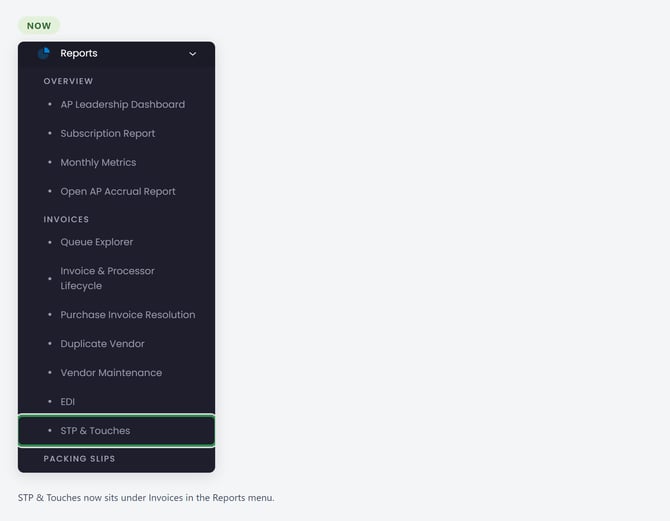
- Add and Fully Receive Fills In the Received Quantity
For clients using Yoga for packing slips. On a packing slip's receiving lines, Add & Pair added the PO line and paired it but left Received blank, so receivers still typed a quantity on every line. The action is now called Add and Fully Receive, and it fills Received with the quantity still open on the PO line, never the full ordered quantity: a line ordered 100 with 40 already received comes in at 60. A quantity already on the row, read from the slip or typed by your team, is kept. A row that would take a PO line past its open quantity stays unpaired, with a message saying why.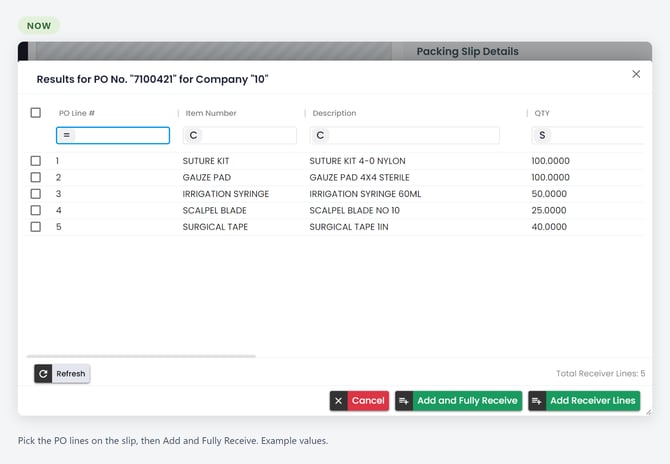
- Payment Method Shows on the Payment Card
For Infor FSM clients who use the Payment Data Sync. The payment card on an invoice now shows how each payment was made, such as a check or an ACH payment, the way it already did for Workday clients. AP can tell a requester how long a payment will take to reach the vendor without looking it up in the ERP. A Last Payment Method field is also available for your invoice form and list views. If you are interested in adding it, reach out to your Client Success team with a ticket to Yoga Support. - Blanket PO Invoices Land on the $1.00 Budget Line
For clients whose blanket POs hold the budget as a $1.00 line. When a blanket PO had a $1.00 budget line beside priced lines, Yoga could fill the invoice on a priced or closed line at quantity 1 with the invoice total as the price, and the ERP then raised a cost message. Yoga now puts the invoice on the budget line as the invoice dollars at $1.00 each, the way your team posts it. When the PO has more than 1 open budget line, or only closed ones, the invoice is left for your team to place.
Opt-In Features
Some features are available upon request. Please submit a request to YogaSupport@rpic.com asking your support team to configure it in your environment.
- 1 Search Box Across Related Columns
A view can now have a search box that looks for a value across a group of related columns at once. The first use is PO numbers: a "PO (any field)" box can search PO Number, Credit PO, and Legacy PO together, so you type the number once and the invoice and its offsetting credit come back in 1 result. You can enter up to 50 values separated by semicolons, and the box works with your other filters and exports. It never shows a document you couldn't already see in that view. If you are interested, reach out to your Client Success team with a ticket to Yoga Support.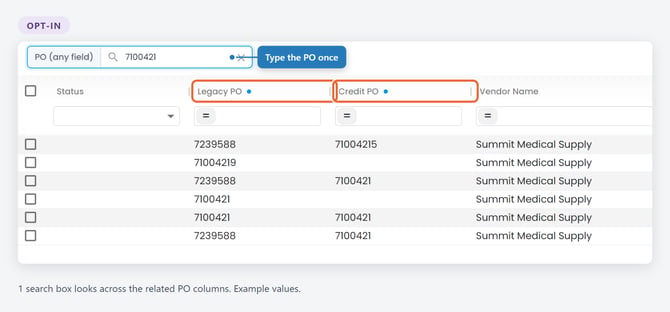
Bug Fixes
- Invoice Lines Pair to the Right PO Line When the Vendor Prints a Shorter Item Code
When a vendor printed a shorter item code than the one on the PO, and several PO lines shared the same price, invoice lines could pair to the wrong PO lines and still go straight through. Yoga now pairs each line to the 1 PO line whose item code contains the printed code at the same unit price. There is nothing to set up, and invoices that already posted are left as they were. - Date Filters Like "This Month" Cover Exactly the Right Days
Relative date filters such as "This month" used your browser's time zone, so a date column could leave out the 1st of the month and pick up the 1st of the next month. Date ranges now follow the time zone set for your Yoga site and include exactly the first through the last day of the period. - Invoices Printed with US$ No Longer Stop for a Currency Error
Some US vendors print their totals as "US$", such as "US$ 183.61". Yoga read the amount correctly but flagged it with "Currency was not USD", so the invoice could not go straight through even though nothing needed fixing. Yoga now checks the currency the amount is in, so US$ totals pass, and amounts in another currency, including Canadian dollars printed with a $ sign, are still flagged for review. The message also appears on the amount that failed, such as the subtotal or tax, instead of always on the invoice total. Invoices already read are left as they were. - Invoice Numbers Set by a Vendor Rule Keep Only the First Line
When a vendor rule read the invoice number from a spot where the vendor prints a 2nd number underneath, such as a customer number, both lines could land in the Invoice Number field, and the invoice could go straight through with them. Yoga now keeps only the first line of an invoice number a vendor rule sets, then applies your usual invoice number cleanup. Invoice numbers on 1 line are unchanged, and invoice numbers already saved are left as they were. - Percentage GL Vendor Rules Split the Invoice Subtotal
For teams that build their own GL vendor rules. A GL vendor rule that splits by percentage, or evenly across lines, sized the GL lines from the invoice total, tax and add-on charges included. On an invoice with tax, a rule mapped at 100% wrote the full total to the GL line, so the coding came in over 100% and someone had to retype the amount. These rules now use the subtotal, the invoice total less tax and add-on charges, so the lines balance. Fixed-amount rules, invoices with no tax or add-on charges, and invoices already coded are unchanged. - Documents Unlock When You Leave Them
After someone left a document, their browser tab could keep renewing the lock every few minutes, so the document stayed locked to everyone else for hours, until that tab was closed or reloaded. Leaving a document now releases it, and tabs that were already open stop renewing locks on documents they have left. While you have a document open, it stays locked to you, as before. - Interrupted Posts No Longer Park the Invoice as Its Own Duplicate
For Infor FSM clients. When a post to the ERP was cut off after the invoice was created but before the image was attached, the automatic retry found that new invoice, treated it as a duplicate, and moved the document to AP Duplicate, leaving the ERP invoice without its image. The retry now recognizes an invoice it created itself: it finishes the post, or removes the unreleased copy and posts again, so the document ends with 1 ERP invoice and its image. Documents already in AP Duplicate for this reason are left as they were.
Upcoming Releases
Planned Features for upcoming releases; timing may shift based on testing and feedback
- Vendor Rules for EDI Invoices
We are extending vendor rules to cover EDI invoices, so rule administrators can work with EDI data alongside the rules they build today. - Document Classification, Yoga Add-on
Continued work on the model that sorts and classifies your incoming documents, focused on accuracy and readiness for wider production use. - Customer Service Agent, Yoga Add-on
Vendors email your AP inbox asking whether an invoice arrived, whether it is approved, and when it will be paid. The Customer Service Agent is being built to handle those routine inquiries directly and to pass anything it cannot answer to your AP team with the context already gathered.
Conclusion
Thank you for being a valued Yoga Software and RPI Client, and for providing us your valuable feedback. To review past release notes, please visit the release notes section in RPI's Yoga Knowledge Base.