![rpic-yoga_flexible_software-logo-color (1).png]](https://hubsupport.rpic.com/hs-fs/hubfs/rpic-yoga_flexible_software-logo-color%20(1).png?height=40&name=rpic-yoga_flexible_software-logo-color%20(1).png)

New Product Features
Product Features are integrated into our Application Code and are a part of every Yoga Production tenant.
- Invoice Lines Pair to the Right PO Line
When a purchase order carries several lines for the same item at the same price, Yoga now pairs each invoice line to the PO line whose quantity or extended amount fits, and uses each PO line only once. Those invoices reach approval or straight-through processing with every line represented, instead of pairing everything to the first line. - Item Codes Match However They Are Formatted
Vendors and ERPs often write the same item code differently, with hyphens, slashes, spaces, or different capitalization. Yoga now looks past those differences when pairing invoice lines to PO lines, so more lines pair on their own and fewer invoices stop for manual pairing. - Type to Find Add-On Charge Codes
The add-on charge code field now supports type-ahead, like the other lookup fields on your invoice form. Start typing a code to find it and fill it in, or keep using the magnifying glass to browse. - Leave One Vendor Out of a View
The vendor number filter on your document views now offers Not Equals, so you can see every document except one vendor, or a list of vendors separated by semicolons, without selecting every other vendor by hand. Documents with no vendor number stay visible, and Not Equals works on the other number columns too. It pairs with the Exclude option we added to the reason code filter last release.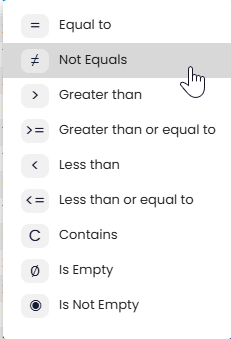
- More From Your Reports
The Processor Lifecycle tab adds a Processor filter next to the Invoice # search, the processor leaderboard shows every processor instead of only the top six, and the longer PIR sections scroll within a set height so processor status stays in reach. Report widgets across Yoga are now clickable and take you to the invoices behind the number, and the Invoice Lifecycle export carries ERP status, reject comments, and payment details. - Rules for Inactive Vendors Pause Automatically
For rule administrators: when a vendor is marked inactive in Vendor Management, all of its field and extraction rules are suspended right away, so a retired vendor's rules stop firing after a consolidation. Suspended rules stay visible for review, can be moved to the surviving vendor, and stay paused if the vendor is reactivated until they are approved again.
Opt-In Features
Some features are available upon request. Please submit a request to support@rpic.com asking your support team to configure it in your environment.
- Straight-Through Processing for Blanket PO Invoices
For clients matching invoices to blanket purchase orders: a blanket PO invoice can now go straight through when it passes a set of safety checks, instead of always stopping in AP Review. The invoice must be an eligible invoice type, fit within the blanket PO line's total, and show no separate add-on charges such as freight and no balance-due or payments-received amounts that could mean the printed total is not the amount owed. Invoices that fail any check route to AP Review as they do today. On dollar-based blanket POs, where every PO line is priced at $1, invoice lines now pair as a quantity of dollars at $1 each, the way processors enter them today. When the invoice's own quantity and unit price add up to the line amount, Yoga keeps those instead of flattening the line.
- Searchable Invoice Images in Infor Document Management
When Yoga posts an invoice image to Infor Document Management, it can now include the purchase order, invoice number, vendor, vendor name, invoice type, and invoice amount. Teams outside AP can find invoice images in IDM, and the images can be linked from your PO and receiving screens.
Bug Fixes
- Statements Are Assigned to the Right Vendor
Some statements that printed the customer name more prominently than the vendor's were assigned to the wrong vendor, or none, which left every line unmatched. Yoga now identifies the issuing vendor the way it does on invoices, checks every name and address on the statement, and can work out the vendor from the invoice and PO numbers on the lines. Anything still ambiguous goes to Needs Vendor rather than being guessed.
Upcoming Releases
Planned Features for upcoming releases; timing may shift based on testing and feedback
- Require GL Columns Before an Invoice Leaves Yoga
Yoga can already require GL columns on the invoice form. We are adding more ways to trigger those requirements, including conditions based on other fields on the invoice, so the GL columns your ERP needs are required in exactly the cases that call for them and fewer invoices come back for rework. - Vendor Rules for EDI Invoices
We are extending vendor rules to cover EDI invoices, so rule administrators can work with EDI data alongside the rules they build today. - Document Classification- Yoga Add-on
Continued work on the model that sorts and classifies your incoming documents, focused on accuracy and readiness for wider production use. - Customer Service Agent-Yoga Add-on
Vendors email your AP inbox asking whether an invoice arrived, whether it is approved, and when it will be paid. The Customer Service Agent is being built to handle those routine inquiries directly and to pass anything it cannot answer to your AP team with the context already gathered.
Conclusion
Thank you for being a valued Yoga Software and RPI Client, and for providing us your valuable feedback. To review past release notes, please visit the release notes section in RPI's Yoga Knowledge Base.