![rpic-yoga_flexible_software-logo-color (1).png]](https://hubsupport.rpic.com/hs-fs/hubfs/rpic-yoga_flexible_software-logo-color%20(1).png?height=40&name=rpic-yoga_flexible_software-logo-color%20(1).png)

Announcements
- Daily Production Updates
We've changed our production migration schedule. Updates used to go to production once every 2 weeks. They now go to production daily.
Why we made this change
- Safer releases. Each daily migration carries a smaller set of changes. That makes each change easier to QA, Regression test and verify, and easier to isolate if something needs attention.
- Better control. Smaller, more frequent releases give our team closer oversight of what goes into production and when.
- Faster turnaround on your requests. When your request is finished and tested, it no longer waits for the next 2-week release window. It can go to production much sooner.
What stays the same
We'll keep sending release notes every 2 weeks. Each set of notes will cover everything that went into production during the previous 2 weeks, so you'll still get one complete summary of recent changes on the schedule you're used to.
- 2 Support Tiers: Silver and Gold
Yoga now offers 2 support tiers, so you can choose the level of support that best fits how your team uses Yoga.- Silver Support: 1 production tenant and 1 non-production tenant, with 32 enhancement hours.
- Gold Support: 1 production tenant and 2 non-production tenants, with 48 enhancement hours per year. The 2nd non-production tenant can be connected to your ERP TRN or TST environment, which makes testing ERP updates easier.
- Legacy Reports Retire on September 30
On September 30 the legacy reports retire and Reports V2 becomes the reporting experience in Yoga. The left navigation will show a single Reports entry that opens the Reports V2 pages you already use, with the same sections and items. The information in the legacy reports is available in Reports V2, in some cases under a new name. If you use a legacy report today and are not sure where to find it in Reports V2, review the Reports Crosswalk User Guide or contact YogaSupport@rpic.com and we will point you to it.
New Product Features
Product Features are integrated into our Application Code and are a part of every Yoga Production tenant.
- Blank Required GL Columns Now Hold in AP Review Instead of Bouncing Back from ERP
Required GL coding is now checked before an invoice leaves Yoga. If any required GL column on a non-PO or credit invoice is blank, even when a rule or script filled the line, the invoice stops in AP Review with a hold alert and a comment listing what to fill in, instead of going to ERP and being rejected. Form triggers can now require a single GL column in specific situations, such as Department for utility vendors, a hidden required column no longer blocks the form, and administrators set Required per column with a checkbox in the Form Editor.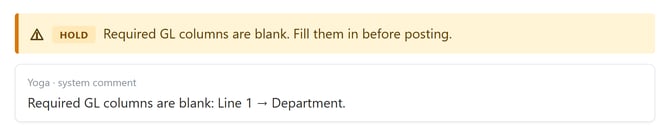
- Route Selected Offers Only the Codes and Queues That Fit
On list views, Route Selected and any custom line action that routes now offer only the reason codes and destination queues that are valid for the documents you selected from their current queue, the same as the open document already does. In environments with more than one product line, a packing slip can't be routed into an AP queue by mistake. Setting a hold reason code from a list view asks for a comment, as it does on the document. Custom line actions your team has set up can also be limited to specific document types.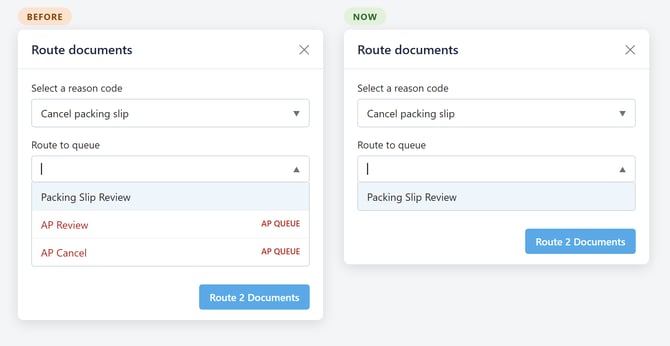
- Repeated Invoice Rows Pair to the PO on Their Own
When an invoice prints the same item on several rows, which is common for serialized or lot-tracked items, only the first row would pair to the PO line and the rest were left unpaired, so AP raised the quantity on the paired row by hand. Repeated rows with the same item and unit price now pair to that same PO line automatically and merge into one line with the summed quantity, with a check against the invoice subtotal so a row the extraction duplicated is not counted twice. Merged quantities also keep their decimals. When the same item appears on more than one PO line, repeated rows fill each PO line ordered quantity before moving to the next, and repeated rows that print no item code are joined too.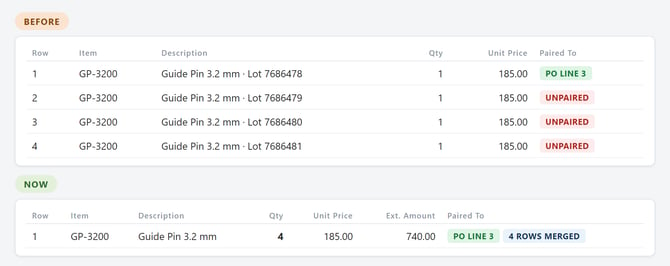
- See Which Mapping Filled a Field, and Filter Mappings Like Rules
For administrators who manage their own vendor rules and mappings. When a vendor mapping fills in a field, the document's notes now name the mapping entry that did it, next to the note that already tells you which rule set a field, and you can click through to that entry in the vendor's mapping table. The automatic company number and IRC lookups are credited the same way, so those values no longer show up as unexplained script changes. In the Vendor Rules Command Center, mappings mode now has the same filters, date ranges, sorting, and saved views as rules mode, plus new filters for Maps To, performance, outcome, header or line, and who edited the entry. Each mapping's performance is now counted from the times it actually ran, so the accuracy you see reflects real use.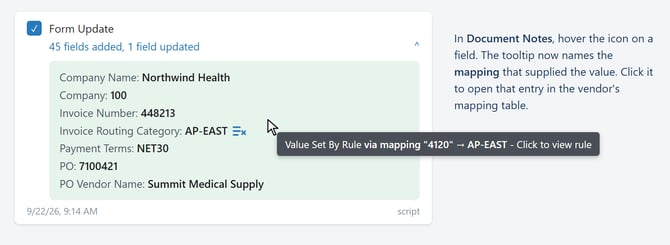
Opt-In Features
Some features are available upon request. Please submit a request to YogaSupport@rpic.com asking your support team to configure it in your environment.
- Pair Invoice Add-On Charges to the PO
When Purchasing records a charge on the PO as an add-on charge, such as freight, a surcharge, a discount, or a trade-in credit, and the vendor bills that same charge on the invoice, Yoga can now pair the 2. The paired charge shows under PO Add-On Charges on the invoice instead of as a new Miscellaneous charge, and it posts to your ERP against the PO's charge, so the invoice posts in balance and the PO charge is closed out instead of staying open on your received-not-invoiced report. If the billed charge does not agree with the PO's charge, the invoice holds in AP Review with a PO Add-On Charge Mismatch reason code rather than posting with the PO charge left open. Credits billed as negative line items, such as trade-ins, are paired also. A PO charge the vendor never bills is left open and the invoice posts as usual.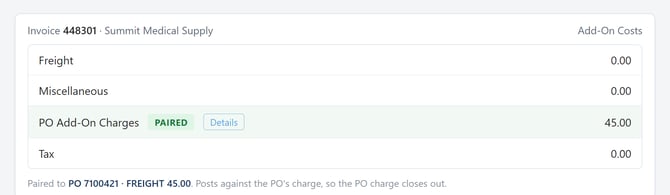
Bug Fixes
- EDI Invoice Images Show Freight in Dollars
Generated EDI invoice images were printing the freight line in raw cents, so a $3.75 charge showed as $375, the image did not tie to its total, and Yoga could pick up an inflated freight amount. Freight now prints in dollars on both EDI image jobs, and tax is formatted to 2 decimals. This bug fix does not apply to Images that have already been created with the wrong value. - Emailed Invoices Not Skipped by the Email Connector
Some instances where Invoices emailed into Yoga were occasionally not imported. The email connector's request to Microsoft 365 for unread messages could came back short or empty even though unread mail was sitting in the folder, and the connector treated that as a non-action until a later run happened to pick the mail up. The request has been corrected so every unread email is retrieved, and if a run still comes back empty while the folder shows unread mail, the connector rechecks within the same run instead of waiting for the next one.
Upcoming Releases
Planned Features for upcoming releases; timing may shift based on testing and feedback
- Statement Matching Free Trial Is Coming to Your Production Environment!
The Statement Matching free trial will move from your TEST environment into your production environment over the coming weeks, so you can try it on live vendor statements and your real AP data. Yoga Super Users will be able to upload up to 5 statements per calendar month from the Statement Automation (Free Trial) page under Capture; Yoga matches the statement lines to your AP data and surfaces the exceptions for you. The limit resets at the start of each calendar month. Statements that Yoga's classifier picks up on its own from your regular intake are not part of the trial and do not count against the 5. Clients already using Statement Matching are not affected. We will let you know when the page is live in your environment.- Want to learn more about our newest feature: Automated Statement Matching? Review the Statement Automation User Guide or the Statement Automation demo. Test it in your environment today - or reach out to our Client Success Team to get a customized demo!
- Route Without Saving Is Going Away
For our Lawson v10 cients, the unsaved-changes routing dialog will offer only Save and Route or Return to doc, so routing from the form always saves and validates first. The Route without Saving option is being removed for all tenants after invoices routed that way skipped form validation and caused problems downstream. - 1 Search Box Across Related Columns
Views will be able to group any set of columns behind a single search box. Type a value once and the view returns every document that carries it in any column of the group, within the views and permissions you already have. The first use is PO numbers, which can sit in PO Number, External Purchase Order, or Credit PO depending on how the invoice was processed, so a "PO (any field)" box finds an invoice and its offsetting credit together. Your consultant sets up which columns belong together for each view. - Payment Method Shown with Payment Data
For Infor FSM clients, the Payment Data Sync will bring in the payment method, check or ACH, show it on the invoice's payment card, and make it available to add to your invoice form and list views, so AP can tell requesters how long a payment will take to reach the vendor. - Vendor Rules for EDI Invoices
We are extending vendor rules to cover EDI invoices, so rule administrators can work with EDI data alongside the rules they build today. - Document Classification- Yoga Add-on
Continued work on the model that sorts and classifies your incoming documents, focused on accuracy and readiness for wider production use. - Customer Service Agent-Yoga Add-on
Vendors email your AP inbox asking whether an invoice arrived, whether it is approved, and when it will be paid. The Customer Service Agent is being built to handle those routine inquiries directly and to pass anything it cannot answer to your AP team with the context already gathered.
Conclusion
Thank you for being a valued Yoga Software and RPI Client, and for providing us your valuable feedback. To review past release notes, please visit the release notes section in RPI's Yoga Knowledge Base.